Get Started in Minutes: Guided Onboarding
New to KAI? A guided onboarding flow now walks you through everything: sign in with GitHub, create a workspace, invite your team, connect integrations, and import your first repository. No docs required.
The Steps
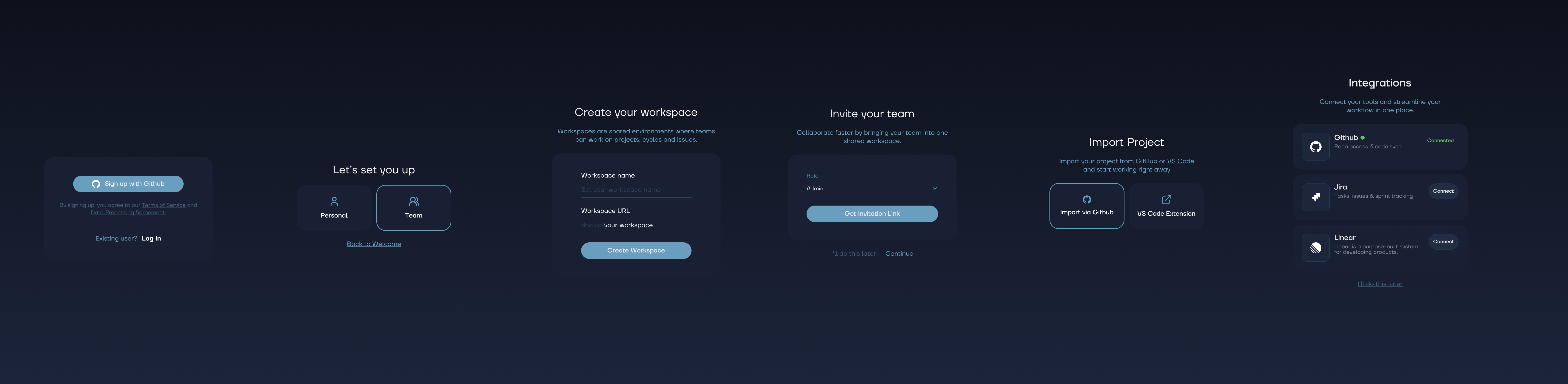
- Welcome - Quick intro to what KAI does
- Get Started - Sign in with your GitHub account
- Setup Type - Choose your path: individual or team
- Create Workspace - Name your workspace and get started
- Invite Team - Add teammates by email (skip if solo)
- Import Project - Browse your GitHub repos and import one to scan
- Integrations - Connect GitHub, Linear, or Jira for issue export
- All Set - You're ready to go
Each step is optional after workspace creation. Skip what you don't need, come back to it later from workspace settings.
OAuth Without the Pain
Connecting GitHub, Linear, or Jira during onboarding triggers OAuth redirects. KAI uses cookie-based context recovery to remember exactly where you were in the wizard. Connect an integration, get redirected back, and pick up right where you left off.