
Vulnerability Management
The web dashboard provides a powerful Kanban-style interface for managing vulnerabilities across all your projects. Track findings from discovery through resolution with full team visibility.The Kanban Board
Visualize and manage your security workflow with drag-and-drop simplicity.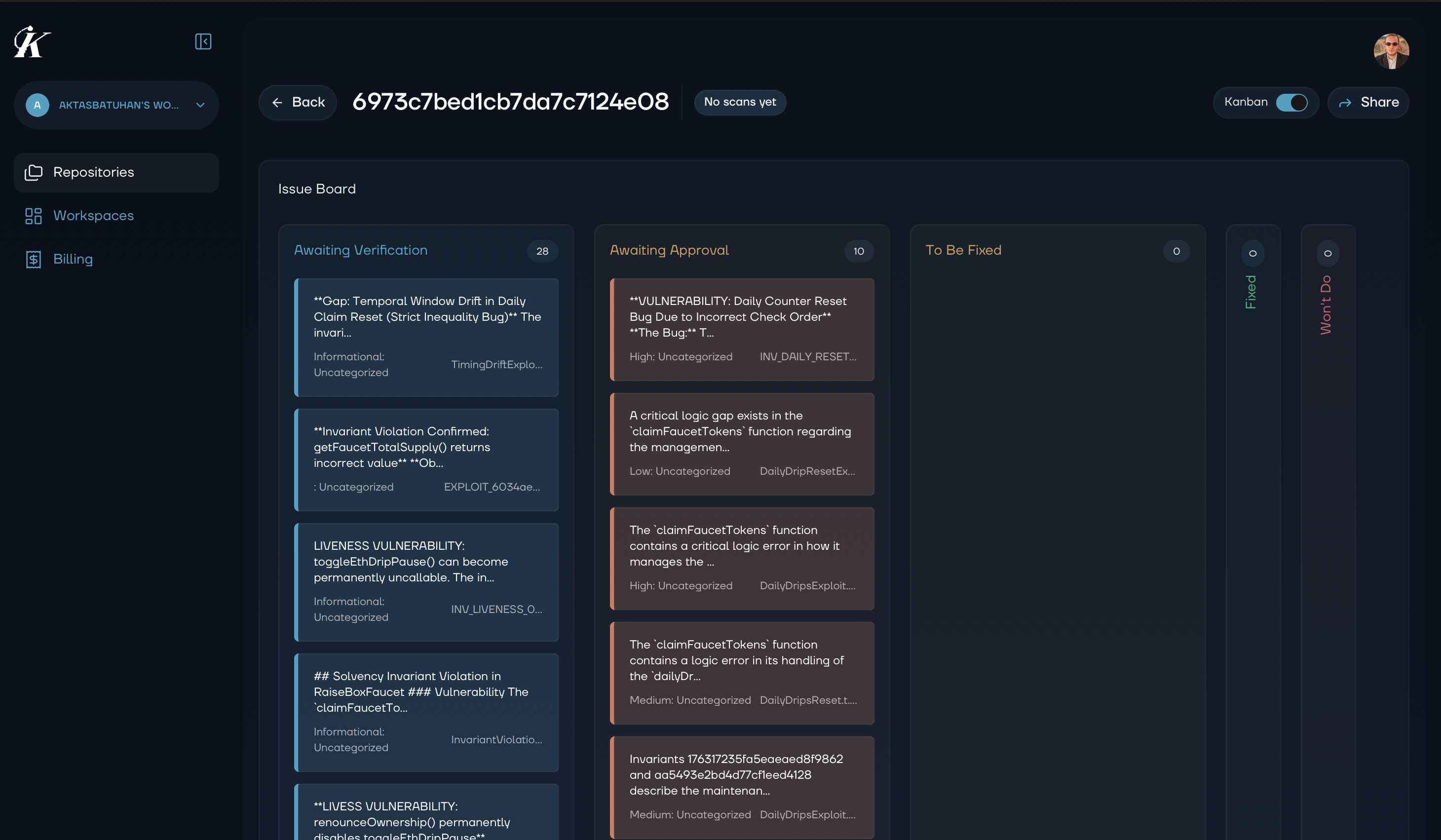
Workflow Columns
| Column | Purpose | Action Items |
|---|---|---|
| Awaiting Verification | Potential issues being analyzed | Wait for Kai to verify |
| Awaiting Approval | Verified vulnerabilities ready for review | Review and triage |
| To Be Fixed | Approved issues ready for remediation | Assign and schedule |
| Fixed | Resolved vulnerabilities | Verify and close |
| Won’t Do | Accepted risks or false positives | Document rationale |
Working with the Kanban
Drag and drop vulnerability cards between columns to update their status. Watch the walkthrough below:Filtering & Sorting
Quickly find the vulnerabilities you need: Filter by:- Severity (Critical, High, Medium, Low)
- Repository or project
- Assigned team member
- Date range
- Severity (highest first)
- Date discovered
- Date modified
- Assigned member
Bulk Operations
Select multiple vulnerabilities to:- Move to a different column
- Assign to a team member
- Apply labels or tags
- Export for reporting
Vulnerability Details
Click any vulnerability card to view:- Full Report: Complete vulnerability description and impact
- Exploit Code: Working proof-of-concept
- Suggested Fix: Code changes to resolve the issue
- History: All status changes and comments
- Related Findings: Similar issues in your codebase
Workflow Best Practices
Daily Security Standup
- Review the Awaiting Approval column
- Triage new findings by severity
- Assign ownership for “To Be Fixed” items
- Celebrate items moved to “Fixed”
Weekly Review
- Audit Won’t Do decisions
- Check for stale items in any column
- Review team workload distribution
- Plan remediation priorities for the week
Integration with Development
Connect vulnerability management to your development workflow:- Jira integration (coming soon): Link findings directly to Jira tickets
- GitHub integration (coming soon): Create issues from vulnerabilities
- Export options: CSV, JSON, PDF for external tracking systems
Exporting Data
Export vulnerability data for:- Compliance reporting
- Executive summaries
- Security audit documentation
- Team performance reviews
Next Steps
- Analytics - View metrics and trends
- Team Collaboration - Work with your team